01Why hotels are automating delivery
Room service, towel requests, amenity kits, linen carts, luggage: a hotel runs hundreds of small deliveries a day, at all hours. They're repetitive, time-sensitive and spread across every floor, which is exactly the kind of work automation does best.
An autonomous delivery robot turns those runs into a reliable, on-demand service. It's dispatched in seconds, finds its own route, calls the lift, arrives at the right door and reports back. It's just as fast at 3 a.m. as at noon. And it gives your property something guests genuinely talk about: a piece of real robotics, gliding through the corridor with their order.
- RoboServe maps your property once, then plans its own routes. No tracks or floor tape.
- With lift and door integration it delivers to any floor.
- It runs about 12 hours on one charge and recharges in about 5, so a two-robot rotation can cover 24 hours.
- It reduces the number of hands that touch food, linen and amenities between source and guest.
02Meet the RoboServe range
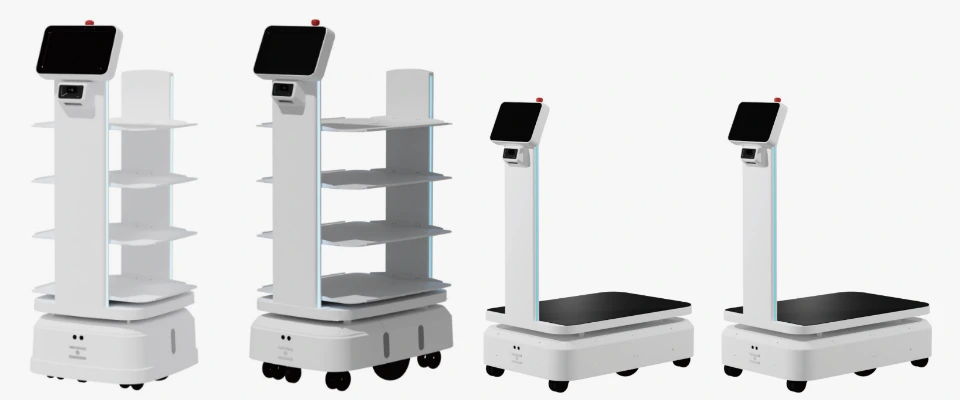
All four RoboServe models share the same navigation system, 10.1" touch screen, 1.2 m/s top speed, 10 mm positioning accuracy, 4G / Wi-Fi connectivity and 12-hour battery. What changes is the top: how much it carries and how it carries it.
| Model | Max load | Carrier | Min. passage | Hotel job |
|---|---|---|---|---|
| RoboServe 80 | 80 kg | Open shelves | 60 cm | Room service, amenities |
| RoboServe 150 | 150 kg | 4 shelves | 70 cm | Restaurants, banquets |
| RoboServe 300 | 300 kg | Flat platform | 70 cm | Linen, housekeeping |
| RoboServe 300E | 300 kg | Large platform | 80 cm | Luggage, bulk items |
03Day zero: how RoboServe maps your hotel
Before a robot can deliver anything, it needs to understand your building. This happens once, during installation, and usually goes like this.
Step 1: The site survey
Our engineers survey the property with your team and note what the robot will need to handle: corridor and door widths (RoboServe 80 needs as little as 60 cm), thresholds and ramps, the service lifts it will use, automatic doors, Wi-Fi coverage in back-of-house areas, and where it will park and charge.
Step 2: The mapping run
Next, the robot is guided through every area it will work in: kitchen, service corridors, lift lobbies on each floor, guest corridors, restaurant floor. As it moves, its sensors record the walls, pillars and fixed furniture around it and stitch them into a digital map of the property. This is the map it will use to find its position, to within about 10 mm, every second it is running.
Step 3: Stations, zones and rules
The raw map is then turned into a working map. We add:
- Stations: named points such as Main kitchen, Room 1204, Table 7, Linen room L2, Charging bay.
- No-go zones: areas it should never enter, like the pool deck edge, a staircase or a guest lounge during events.
- Preferred lanes: service corridors it should use instead of the lobby whenever possible.
- Speed zones: slower speeds near busy spots like buffet counters or lift lobbies.
Step 4: Choosing a navigation mode
RoboServe supports four ways of moving, and you can mix them by area:
- Free mode: the robot plans the best path across the whole map and goes around obstacles on its own. Best for open restaurant floors.
- Track mode: the robot follows fixed virtual lanes you define. Best for predictable back-of-house routes and narrow corridors where you want exact behaviour.
- Hybrid mode: lanes where they matter, free navigation everywhere else.
- Follow mode: the robot follows a staff member (optionally wearing a follow wristband). Great for ad-hoc jobs like a banquet set-up or a one-off luggage run.
If you move walls or add permanent furniture, the map is simply updated for that area. Day-to-day changes like a room-service trolley in the corridor don't need a new map, because the robot treats them as temporary obstacles.
04Navigating safely among guests
Hotels are not warehouses. Children run, guests stop to chat in corridors, housekeeping trolleys appear without warning. RoboServe is designed for exactly that.
- It knows where it is. It compares what its sensors see against the stored map many times a second to hold its position.
- It sees what's new. Anything not on the map, such as a person, a suitcase or a trolley, is treated as an obstacle.
- It re-plans. If a corridor is blocked, it slows, steers around the obstacle or picks another route. If there's no way through, it waits politely.
- It moves at human pace. Its top speed is 1.2 m/s, and it can be configured to go slower in busy zones.
- It announces itself. Notification lights and speakers tell people it's coming, and it can play a polite voice prompt when it needs to pass.
05Lifts and doors: going multi-floor
A robot that can't use the lift can't do room service. With the optional lift integration and automatic door control add-ons, the robot gets electronic access to both. A typical delivery to the 12th floor looks like this:
- The robot reaches the service lift lobby and sends a call signal to the lift controller.
- The lift arrives and the doors hold open; the robot checks the car has space and drives in.
- It requests floor 12. When the lift arrives, it exits, re-localises on the floor-12 map and continues to the room.
- On the way back, the same sequence runs in reverse. Automatic corridor or kitchen doors open on request as it approaches.
Every lift controller is different, so we check yours during the site survey and confirm the integration approach in the quotation.
06Calling the robot
Your team should never have to think about robotics. Sending a task is designed to take seconds:
- Touch screen: load the shelf, tap the room or table on the 10.1" screen, press go.
- Call buttons: wall-mounted buttons at the kitchen pass, linen room or bell desk summon the nearest robot.
- Phone or tablet: dispatch and monitor from a device, handy for the in-room dining desk.
- Follow wristband: the robot locks on to a staff member and follows.
07The delivery moment
This is where guests meet your technology, so it's worth getting right.
- The robot arrives outside the room and parks clear of the door swing.
- The guest is notified by a phone call from the desk or the robot's own arrival signal. Lights and a voice prompt mark its arrival.
- The guest takes the order directly from the shelf or cabinet. The screen confirms which tray is theirs.
- The guest taps to confirm, and the robot heads back to base or to its next task.
Many properties brand the screen and voice prompts with their own welcome message. It's a small touch guests photograph and share.
08Charging and shift planning
Each RoboServe runs about 12 hours on one charge and takes about 5 hours to recharge. Actual runtime depends on load, distance and how much time the robot spends waiting versus driving, so we model it for your property during the survey. Here's how hotels typically plan around those numbers.
One robot: a full service day
A single robot comfortably covers a 12-hour window, for example 07:00 to 19:00 for breakfast, lunch and afternoon amenity requests, then charges overnight in its bay. This is the most common starting point.
Two robots: round-the-clock cover
Because a charge takes less than half as long as a run, two robots can hand over to each other and cover all 24 hours, each with spare standby time:
Charging tips from the field
- Put the charging bay on the main service route, usually near the kitchen or service lift, so the robot doesn't waste battery travelling to it.
- Top up in quiet windows. The 15:00 to 18:00 lull between lunch and dinner is perfect for a partial charge.
- Watch the dashboard, not the robot. Battery level is visible on the screen and on connected devices.
- Size for your peak hour, not your average. Breakfast room service and check-out luggage define how many robots you need.
09How robots improve hygiene
Food safety and housekeeping hygiene come down to one principle: the fewer uncontrolled contacts between the source and the guest, the lower the risk. A robot helps on several fronts.
1. Fewer hands on every tray
In a traditional room-service run, a plate may be handled by the chef, a runner, a lift attendant and a server before it reaches the guest. With RoboServe, the kitchen loads the shelf and the next hands to touch it are the guest's.
2. Contactless hand-off
Guests collect the order directly from the robot. There's no hand-to-hand exchange at the door, which many guests now actively prefer, especially families, long-stay guests and anyone who's unwell.
3. Covered transport
Open shelves suit plated food under cloches, but for items that should stay fully enclosed you can add custom closed cabinets on top of the platform. Food, fresh linen and amenities travel covered from start to finish.
4. Separate clean and soiled flows
One of the most powerful hygiene tools is simply dedication. Assign one RoboServe 300 to clean linen and another to soiled linen, or give each its own cabinet, and the two streams never share a trolley. Their routes can even be set to use different lanes on the map.
5. Fewer contacts in shared spaces
Automated runs between kitchen, laundry and guest floors mean fewer people moving through shared corridors and lifts. That matters in resorts and especially in hospital-hotel hybrids and serviced apartments.
6. Easy to clean
Shelves, platforms and the body can be wiped down between runs as part of your normal sanitation routine. A simple daily checklist covers it:
- Wipe shelves or platform and touch screen at shift change, using cleaning agents approved for plastics and screens.
- Empty and clean any closed cabinets after every food run.
- Check that bumpers and sensor windows are clean (this also keeps navigation sharp).
- Log the clean in your existing HACCP or housekeeping records.
A robot is a tool that supports your hygiene protocols; it doesn't replace them. Your existing food-safety and infection-control procedures still apply, and the robot makes them easier to follow consistently.
10Which model for which job
RoboServe 300E rounds out the range with a 770 × 600 mm deck for luggage, conference equipment and bulk deliveries. A typical 150 to 250 key city hotel starts with one RoboServe 80 for in-room dining and one RoboServe 300 for housekeeping, then adds a 150 for banquets or a 300E for the bell desk.
11Your staff and your guests
For staff: a teammate, not a threat
The most successful deployments frame the robot as the team's new runner, not a replacement. Involve your F&B and housekeeping leads early, let them name the robot, and ask them which trips they'd most like to hand over. Training takes a single session: how to load, how to send, what to do if it's blocked.
For guests: delight, with an off-switch
Most guests love a robot delivery, and it often becomes a talking point in reviews. Still, always offer a human alternative on request, and keep the robot out of spaces where it doesn't fit the mood, like a quiet spa corridor.
12Rollout roadmap
Discovery call
We understand your property, outlets and pain points.
Site survey
Passages, lifts, doors, Wi-Fi, charging locations.
Proposal & quotation
Recommended models, add-ons, integrations and timeline.
Installation & mapping
Map the property, define stations and zones, integrate lifts and doors.
Training & pilot
Train staff, run on selected floors or outlets, fine-tune routes.
Go-live & support
Scale to the whole property, with ongoing support from our regional teams.
13Measuring success
Decide what "good" looks like before go-live, measure a baseline, and compare after 30 and 90 days. Useful metrics include:
- Order-to-door time for in-room dining
- Peak-hour throughput during breakfast and check-out
- Deliveries per shift handled by robots
- Guest feedback mentioning speed or the robot experience
- Linen and amenity request fulfilment time
14Frequently asked questions
Do we need to install tracks, tape or markers?
No. RoboServe uses map-based navigation. It learns your property during installation, and you can define virtual lanes on the map if you want track-like behaviour.
What if Wi-Fi drops in a corridor?
The robot navigates using its own on-board map and sensors, so it keeps moving. Connectivity (Wi-Fi or 4G) is used for dispatch, monitoring and lift integration, and we check coverage during the survey.
Can it carry hot soup without spilling?
Yes. Acceleration and braking are smooth, and positioning is precise. We recommend lidded containers or cloches for liquids, as you would with a human runner.
What happens if a guest blocks it?
It stops, plays a polite prompt and waits, or finds another route if one exists. An emergency stop is always available.
How much does it cost?
Pricing depends on models, quantity, add-ons and integration. Request a quotation and we'll tailor it to your property.
See RoboServe in your own corridors
Tell us about your property and we'll suggest the right RoboServe models, with a site survey and detailed quotation.